Simple Academic Resume Template
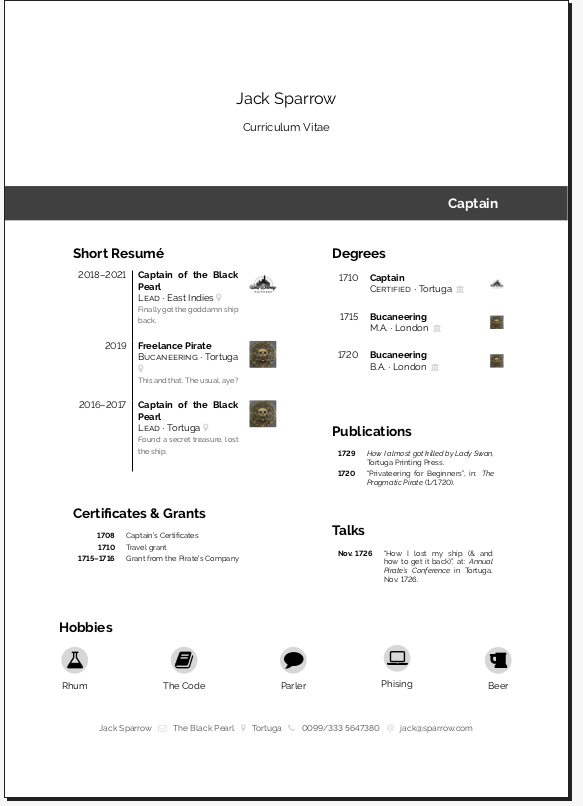
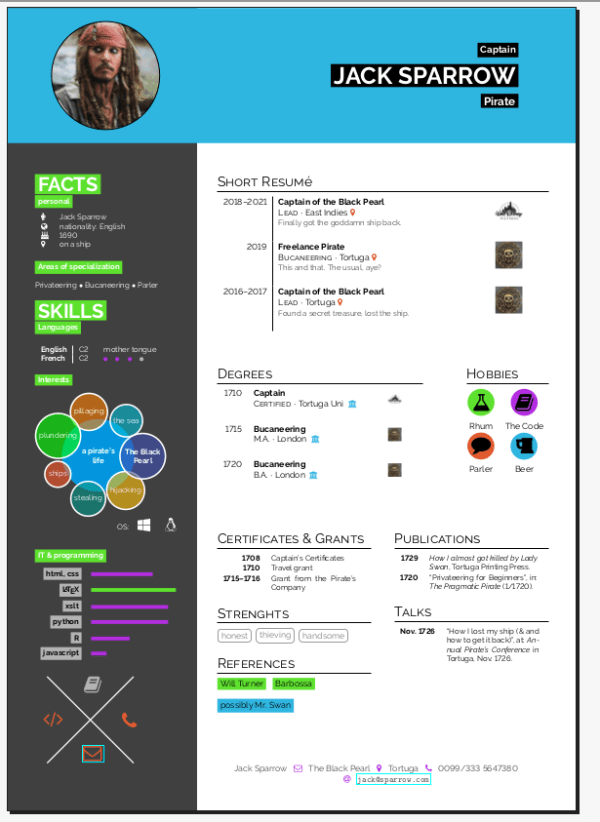
Dear all, just quickly sharing another CV template. This time a bit less colourful to complement yesterday’s Hipster CV.
This is the top-level meta category containing all sorts of posts with meta information.
Dear all, just quickly sharing another CV template. This time a bit less colourful to complement yesterday’s Hipster CV.
Dear all, sorry you haven’t been hearing from me so much lately. It’s been quite busy. To make it up
Inspired by a current issue from my friend the LaTeX Noob, I wanted to give a short explanation on how you can combine floats (i.e. figures) and minipages. Why should you care? Well, if you need tikzpicture or images placed besides eachother or beside text. So most people will probably need this at some point 😉 A great resource is the WikiBook, as always. If you want the lengthy account – that’s the way to go. For everybody else, an explanation of my own. Floats and non-floating boxes What are floats? Some fundamental explanations first: A figure is a float. A minipage is not a float but a box which sits at its fixed place. These are two fundamentally different things. When you combine them in a bad way, LaTeX might get fed up at this. So when planning your minipaging or floating situation, ask yourself which effects are really important to you and which aren’t. Do I even need
Dear all, apparently the LaTeX Noob is not alone to be a noob 😉 I just realized I had to approve your comments before they are published. Oops 😉 Will see to that more quickly in the future. Also, I heard that some of you were not able to find contact information which maybe I might have messed up too 😉 I guess I just hadn’t really thought about having actual readers who want to contact me so far. And I am very happy that you exist and do wish to contact me! I will therefore add my contact info in the about section. Sorry, I am such a complete idiot not to have thought about this before 😉 Best and thanks again for all your positive feedback!
I am happy to introduce my first guest post on this blog. It’s from my archaeologist friend whom we decided to call “the LaTeX Noob” here. She will give her perspective on how using LaTeX in the Humanities feels for her and the problems she has encountered. Like how getting help can be tricky, you don’t want to look like an idiot and how you constantly have to defend your choice to use LaTeX (to users and non-users alike). “Why would a Humanities person want to use LaTeX anyway? You don’t need it and you’re not up for it” are the most common insults a Humanities person might have to endure after choosing LaTeX. Here come the confessions of a LaTeX Noob: Confessions of a LaTeX Noob Okay, here I am, the LaTeX noob. Well, not that noob-noob, but noob nonetheless. I am an archaeologist and I am trying to write my thesis in LaTeX. Well, my catalogue, to
Today, I wanted to share this super simple XML to LaTeX tutorial. Using XSLT, you are going to transform XML data to LaTeX output which you can then go on to compile into your desired output PDF. There will be no fancy stuff whatsoever in this post, just the basics and what to keep in mind with these transformations. It is the quick intro to XML to LaTeX I did with my students a while ago which was done one day after they had their first contact with XSLT, so it should really be beginner-friendly. I labeled it “Advanced LaTeX” anyway because I think starting to automate things is always a step in the right direction 😉 Edit March 2022: Sadly, with WordPress changes (and source code support never working all that well to begin with), the code formatting of this post is pretty broken. Since it tends to re-break soon after I fix it, here is a similar /
When writing my last post on how to earn money with LaTeX I realized I actually had a lot of advice on planning and scheduling your project as well. So I will sum up my experiences with all sorts of “customers” (be it project partners or whatever you have). Motivation This is not to complain how horrible things are but just to sum up a few things you should take into account that an unexperienced person might not find self-evident. Seeing as my days of being unexperienced myself are not very far away, the learning process is still pretty fresh and I still remember the problems a beginner can face, so I hope to be able to provide valuable advice. Some of the advice is copied out of the earning money post, so don’t be confused if you feel like you might have already read some of this. Initially I had wanted to extend the old article but since it already
There is this StackOverflow question as to how to monetize your LaTeX skills. So in this post, I want to discuss whether you can earn money using LaTeX and if yes, how so? I also did a little survey on my Twitter, so I can offer you more than just my own biased opinion. Especially as I have done paid work using LaTeX but I don’t regularly do paid work using LaTeX and am happy to have a job where I can use LaTeX often, but am by no means paid specifically to do LaTeX (which is something I highly recommend you aim for too). This post has gotten pretty lengthy, so feel free to read selectively and jump to whatever you’re most interested in. Experiences in the #TeXLaTeX community This is the Twitter post where I asked fellow TeX lovers for their experiences to include in this post: Currently working on a post on “How to earn money
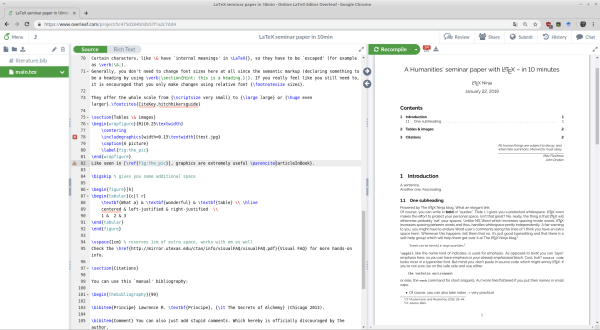
Don’t believe me when I claim you could write a whole seminar paper in 10 minutes? I wouldn’t either 😉
read more A Humanities’ seminar paper with LaTeX – in 10 minutes
I recently became aware of this post where somebody asked how you can become faster at typing LaTeX. Just a little post with a few recommendations. Experience from constantly using LaTeX for everything I have to say, I think it really gets better with experience. And experience from doing your everyday stuff in LaTeX (like to do lists, taking notes, etc.). Else you probably just won’t get enough experience to become really fast. Raise awareness But then again, slowing down might not be a bad thing if you’re supposed to produce high quality work. Using LaTeX, then, will force you to take the subconscious back into your conscious mind. Maybe not what you want when just quickly taking notes, but maybe something to reflect upon in the long term. I also found that, since I don’t constantly use MS Word’s auto-correct anymore, I’m actually better at spelling and grammar (even though, as someone holding a degree in Latin, I probably
This is just a quick post, telling you to use tutorials selectively. If you don’t have time, don’t burden yourself with the not-so-short intro to LaTeX or 30 min introductions. Jumpstart in 3 minutes and go. This morning, I realized one thing: depending on what you want to do with LaTeX, you only need a very limited amount of commands. Even I use a very limited amout of commands for everyday tasks. Going through a whole tutorial might actually be a waste of time for you. You only need 3-5 go-to commands What you always need (and, for example, an Overleaf blank document already supplies): You will typically need the general document setup (minimal example), \newpage, \maketitle, \tableofcontents, and \sections and \emph{}. For teaching documents, I will additionally need \textbf{boldface}, enumerate and itemize environments. Then maybe \href{http://latex-ninja.com}{links} (\usepackage{hyperref}), \texttt{typeface} for code or the verbatim environment. And, of course, I often use my cheatsheet template. For writing scientific articles, I
In my first post on didactical reduction, I argued that reduction of learning materials to meaningslessness can be detrimental, that teachers should trust in their students’ ability to learn and rise to a challenge. In this post I want to discuss ways of reducing complexity which actually makes sense. The gist is: reduce unneccessary detail, not difficulty. Build complexity in a carefully chosen progression. Telling the difference between unnecessary detail and challenging complexity In my post on why programming classes fail and learning ‘algorithmic thinking’, a main example was that students starting out programmig don’t need to know about data types. I will stick with this example here because I just think it illustrates my point so well. The skill to learn I discussed in the post really wasn’t the ‘vocabulary’ of your first programming language, but ‘learning programming’ means successfully communicating with a computer and in order to do that, you need to develop the skill of algorithmic thinking. This
I want to dedicate this post to the pressing question of how to live without MS Word in the Word-filled environment of Academia where Word lurks behind every tree and jumps at you when you’re not paying attention. Do you actually enjoy this eternal distraction of a non-working text editor? Well, I don’t. And even though it’s not actually a good tool (if you’re being honest with yourself, deep down in your heart, you know I’m right), it has infested the world (not only of Academia). How the story begins… At some point, now over a year ago, I decided that I wanted to quit MS Word once and for all. I had hoped to do that before but every single time, I had came up with about a million excuses why I just couldn’t. Probably kind of like you are now already preparing your counter arguments as to why that might work for me but it sure as hell
In this short little post, I want to share some thoughts on deliberate practice and how it affects coding, learning how to program, etc. I will argue that, in the long run, you can only become a better programmer with some systematic (self-)education, be it from books or academic classes. Tutorials alone, on the other hand, get you actionable quickly but do this at the expense of providing “the bigger picture” which will ultimately harm and slow down your progress. The concept of deliberate practice I have been intrigued by the concept of ‘deliberate practice’ for a few years now. It mostly comes up in the context of the so-called 10.000h rule (popularized by Malcolm Gladwell’s The tipping point – which is full of blatantly false information by the way and has been debunked by Steven Pinker, see Resources). Deliberate practice is needed for expertise and reaching a level of mastery. If you just want the ‘quick fix’, don’t bother
read more Learn programming from a book vs. tutorial? Thoughts on deliberate practice
Dear all, just a little info that I am having trouble with the WordPress Markdown support. Which is actually not a correct statement because it really doesn’t work. So let’s say WordPress’s alleged-markdown-but-not-actually-supporting-markdown-thingy. Which has caused me hours of worry already. The code support works ok but not if written in MarkDown. I will do everything using keyboard shortcuts from now on so it will be ok in the future. However, I continue to find serious markdown problems in the old posts. I’m working hard to get rid of them. But some of them are really tricky and tedious, so this might take a while. Particularly horrible is the code support using XML. Because the editor will do some automatic whatever and ruin the XML, trying to make HTML out of it via auto-correct or something. I will not use that feature anymore to spare you and me the inconvenience. Until then, please bear with me until I have tidied
I had been using LaTeX for 5+ years and had always wanted to “do more”. But somehow I never did. The LaTeX Ninja was not a label I put on myself – it was a goal. I wanted to become a LaTeX Ninja and I wrote it down in my notebook. The plan Just before Christmas this year, I rediscovered that old piece of paper. I had been working in Paris at the time and I had already typeset one book with LaTeX but was no further along the path of the LaTeX adept than I had been when the idea of “wanting to become a LaTeX Ninja” had first crossed my mind. Then, that summer when I was working in Paris, I decided: if I ever wanted things to happen, I had to put my plans into action. So during my last week in Paris, I started diving into what I want to call “Advanced LaTeX” (see [THIS POST]
read more Learning “Advanced LaTeX” – The LaTeX Ninja Project
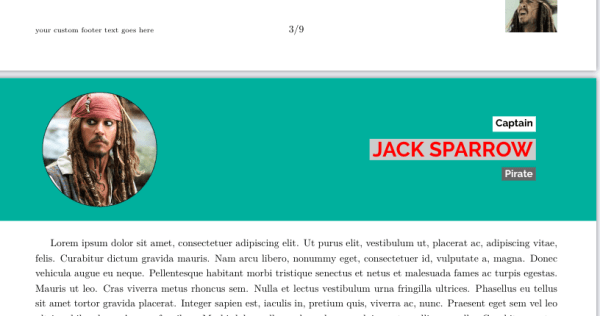
This post explains advanced uses of headers and footers. The template changes between two fancy pagestyles and provides a TikZ based header and a
Inspired by the learn x in y minutes tutorials, here comes my contribution to starting LaTeX quickly. If you want to jumpstart learning LaTeX, open your Overleaf account (or get one, they just require your email, no other info, takes 30 seconds) and open a blank or example project. A blank project will give you the following output: You can now start typing text. Wherever you want, but for now, preferably below \section{Introduction} and in between \begin{document} and \end{document}. The stuff before is the settings which don’t interest you just yet. There you can see fields for title and author which \maketitle uses to make a title. This is what you can use to generate a title page later on. Now type a sentence below \section{Introduction}, then hit space twice. Write another test sentence. Hit space twice and write \subsection{test}. To see your changes, you need to ‘compile’ this source code into an output PDF. Do this in Overleaf by
In today’s tutorial I will show how to reproduce a beautiful example of historical print using XeLaTeX. The inspiration for
This seems to be a bold claim. Let me explain… There are two reasons why I think most introductory programming classes fail ant that is a) because they never actually teach prorgramming (i.e. “algorithmic thinking”, not the syntax of one concrete language / “your first language”)) and b) because they bombard students with tons of complicated subjects which are not necessary at the beginning, so nobody remembers or understands them anyway. But they confuse the students and distract them from what they really should learn like how to interact with the machine and basic flow control. Use a visual language (like Scratch for PC or Catrobat for mobile devices) and thank me later. Algorithmic thinking When we want to learn or teach how to program, we first need to define what programming is. Like in a human language, knowing the words and the grammar is not enough – knowing a language means “knowing how to communicate using that language”. For
read more Why most “learn programming” classes, books and attempts fail